Class Content
HTML Basics & Structure
This module focuses on building a strong foundation by helping learners understand what HTML is, how websites work, and how HTML tags and elements structure web content. Topics Covered: Topic 1: Introduction to HTML Topic 2: How Websites Work Topic 3: Understanding HTML Tags and Elements Learning Outcomes: By the end of this module, learners will be able to: Explain what HTML is and why it is important Describe how browsers display websites Identify HTML tags and elements
0/6
HTML PAGE STRUCTURE & CONTENT
Module Description: This module focuses on writing real HTML code and creating visible webpage content. Learners will practice structuring HTML documents and adding text elements to build complete web pages. Topics Covered: Topic 4: Basic Structure of an HTML Document Topic 5: Creating Your First HTML Page Topic 6: Adding Headings and Paragraphs Learning Outcomes: By the end of this module, learners will be able to: Write a complete HTML document structure Create and open an HTML file in a browser Add and organize text content using headings and paragraphs
0/6
HTML Basics: Build Your First Website

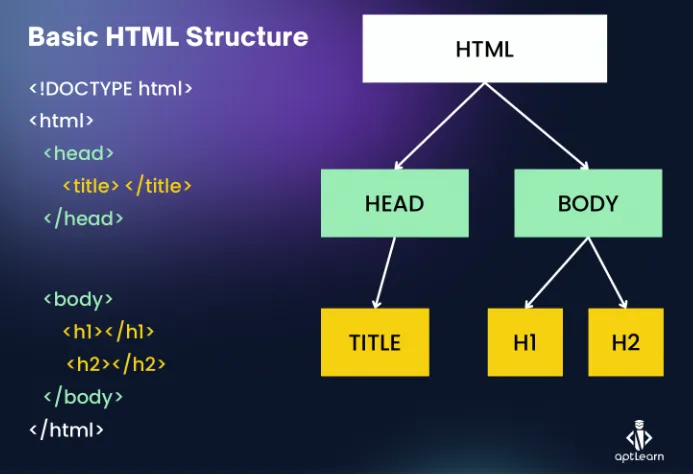
Every HTML webpage follows a basic structure that helps browsers understand and display content correctly. This structure acts like the skeleton of a webpage.

An HTML document begins with <!DOCTYPE html>, which tells the browser that the document is written in HTML. The <html> tag wraps the entire webpage.

Inside the <html> tag are two main sections:

  • <head> – contains information about the page such as the title

  • <body> – contains all the visible content on the webpage

Without this structure, browsers may not display webpages correctly. Understanding this layout is essential for writing proper HTML code.


Exercise Files
Topic_4_Basic_Structure_HTML.pdf
Size: 1.78 KB