Class Content
HTML Basics & Structure
This module focuses on building a strong foundation by helping learners understand what HTML is, how websites work, and how HTML tags and elements structure web content. Topics Covered: Topic 1: Introduction to HTML Topic 2: How Websites Work Topic 3: Understanding HTML Tags and Elements Learning Outcomes: By the end of this module, learners will be able to: Explain what HTML is and why it is important Describe how browsers display websites Identify HTML tags and elements
0/6
HTML PAGE STRUCTURE & CONTENT
Module Description: This module focuses on writing real HTML code and creating visible webpage content. Learners will practice structuring HTML documents and adding text elements to build complete web pages. Topics Covered: Topic 4: Basic Structure of an HTML Document Topic 5: Creating Your First HTML Page Topic 6: Adding Headings and Paragraphs Learning Outcomes: By the end of this module, learners will be able to: Write a complete HTML document structure Create and open an HTML file in a browser Add and organize text content using headings and paragraphs
0/6
HTML Basics: Build Your First Website

📖 Detailed Explanation

HTML uses tags to define content on a webpage.
Tags are written inside angle brackets, such as <p>.

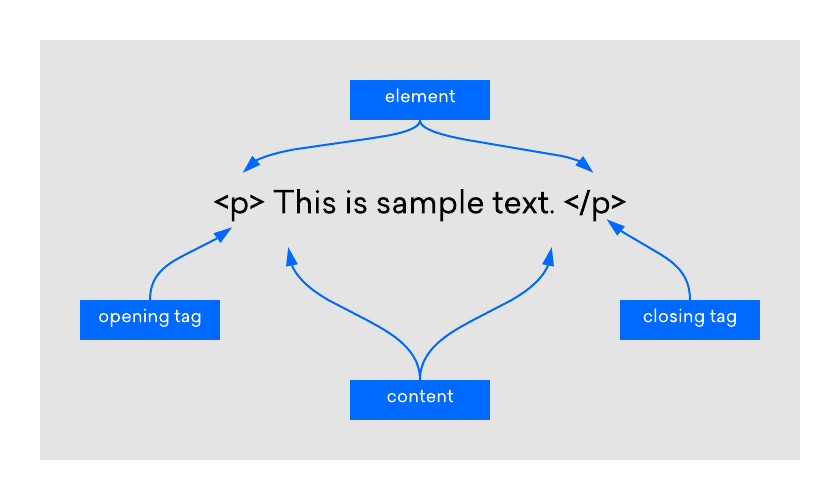
Most HTML tags come in pairs:

  • An opening tag

  • A closing tag

Example:
<p>This is a paragraph</p>

Here:

  • <p> tells the browser to start a paragraph

  • </p> tells the browser to end the paragraph

  • The text in between is the content

An HTML element includes:

  • The opening tag

  • The content

  • The closing tag

Tags help the browser understand what each piece of content means, not just how it looks.

🎯 Key Points

  • Tags define content

  • Elements include tags and content

  • Most tags open and close

Exercise Files
Topic_3_HTML_Tags_and_Elements_Detailed.pdf
Size: 1.96 KB